
“The barista no longer calls to ask if the money came in”
An invoice in two taps, parked tables, QR auto-confirmation without access to your bank, a Wallet card and separate tips for the barista via a Jar.
Coffee shops and bakeries
Features
Payment methods4 methods Tap to Pay, Pay by Bank, QR and payment links Why a register Six small-business problems and how the register solves them Without power or internet Offline up to 36 hours: how it works and its limits Start in 5 minutes From signing in with a QES to the first receipt Register demoNo sign-up Try the register before signing upFor accountants
DashboardNew Payments, fiscal receipts, stock and taxes Reporting Income ledger, group limit, single tax and SSC Savings calculator What the terminal and subscription cost you FOP guideGuide Ukraine’s PRRO law in plain wordsRahunok
rahunok.com Invoices, QR and Pay by Bank for business Statement converter Bank statement → income ledger Acquiring calculator Margin and card fees API documentation REST, webhooks and OpenAPI5 minutes That’s all it takes in Ukraine — from registering a business to the first payment and a fiscal receipt.
Cards via Tap to Pay, Pay by Bank and QR, payment links — in one phone. The register registers itself with the tax service, issues the fiscal receipt and prepares reports for your accountant. Launch in 5 minutes, with our help.
Hard to know where to start We help with the account, register and cashiers — first receipt in 5 minutes
The first 10,000 entrepreneurs get every feature free · The web register works now, iOS and Android coming soon · Part of the Rahunok ecosystem
Payments
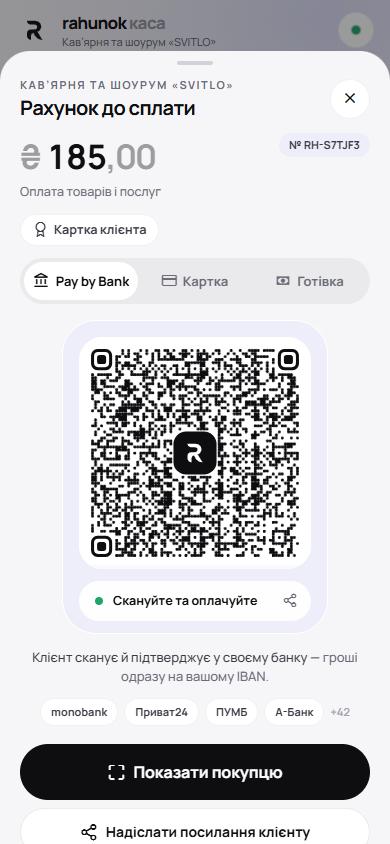
The customer pays the way they like. The cashier doesn’t pick a bank or check statements: they see one “Paid” status confirmed by the bank — and the register issues the receipt right away.
Every payment has a status. For a monobank account the register confirms the credit itself, and the cashier only sees “Paid ✓”.
The receipt is created and sent to the DPS automatically, the Z-report closes itself. Where the law allows — a receipt without fiscalisation.
Every payment goes into the income ledger. The register calculates the group limit, single tax, military levy and SSC itself.
From the first payment the customer gets a loyalty card on their smartphone — no forms. Bonuses are redeemed as a discount right on the receipt.
Why
Six reasons entrepreneurs put off a cash register until the last moment. We removed every one.
“Every month I pay for PRRO and terminal rental”
Receipts go straight to the free DPS server, no paid middleman. You take payments by QR to your IBAN or by card on your phone — no terminal to rent.
“Account, QES, filings, register, cashiers — where do I even start?”
The register files 20-OPP, 1-PRRO and 5-PRRO in the Electronic Cabinet itself. And we help you open an account, create a register and add cashiers — each with their own PIN.
“I’m afraid of fines for a forgotten Z-report or an exceeded limit”
Auto-Z closes the shift before the 24th hour. The tracker shows income against your group limit and forecasts when it will be reached.
“Power’s out — sales stopped”
Receipts stay valid, are stored on the phone and go to the DPS as soon as the connection is back. All you need is a phone and a power bank.
“My seller asks for a screenshot or bank access”
Account, statement, reports and settings are for the owner only, behind a PIN. No more transfer screenshots.
“Every quarter my accountant collects data piece by piece”
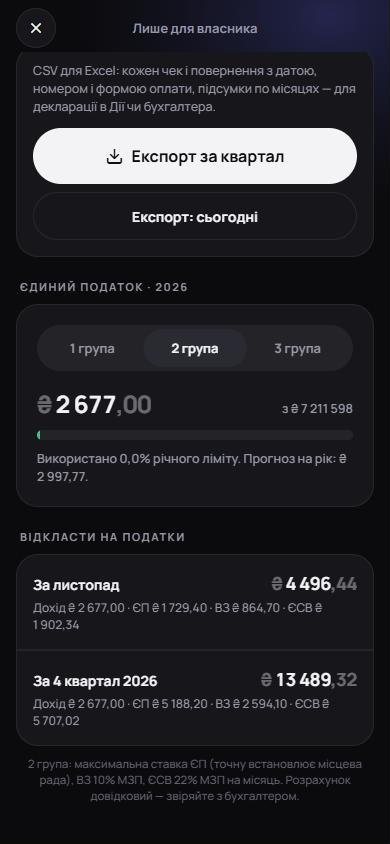
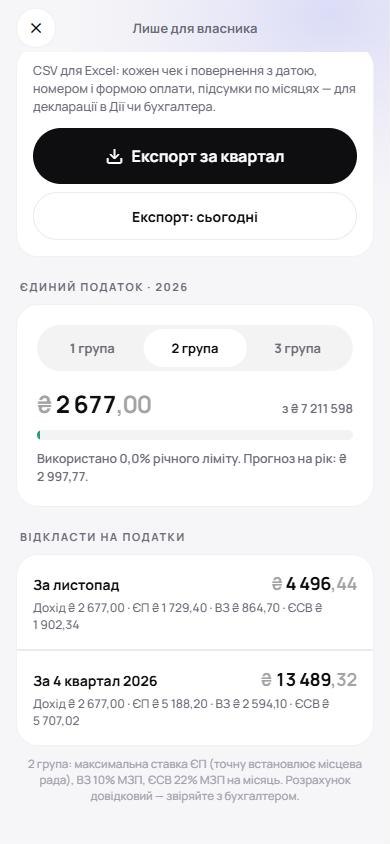
CSV for Excel with every receipt and refund. Single tax, military levy and SSC already calculated at 2026 rates.
PRRO
Straight to the fiscal server. No paid middleman, with a log of acknowledgements.
Pay by Bank
No terminal to rent. The customer pays in their own bank; for a monobank account the register confirms the payment itself.
Blackout
Offline for up to 36 hours in a row. Receipts are stored on the phone and sent to the DPS automatically.
Inventory
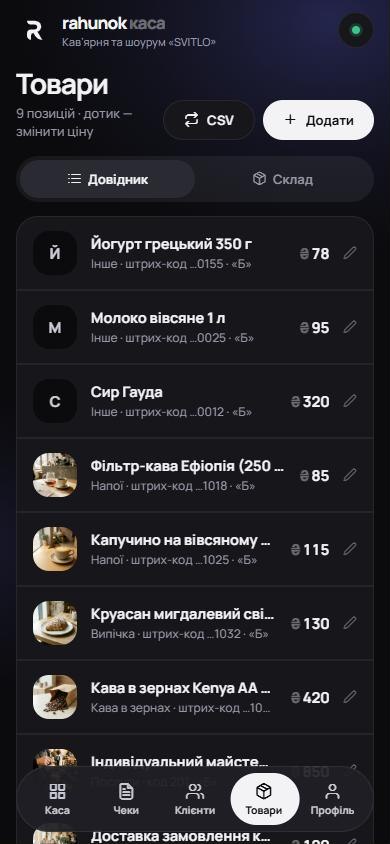
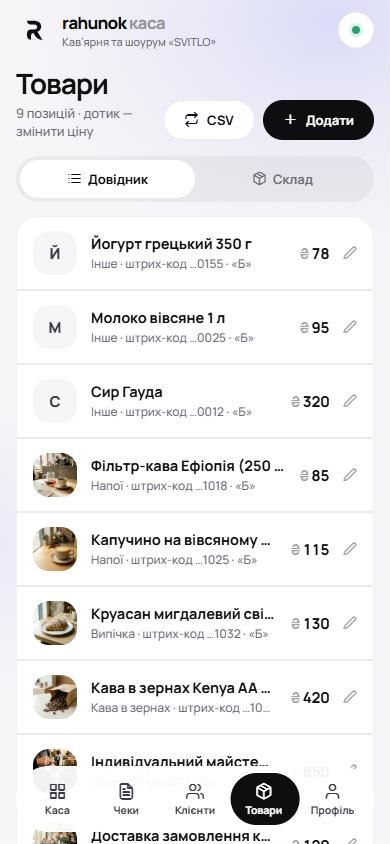
Delivery notes, write-offs, stocktaking, weighed goods and CSV import of the catalogue.
For the accountant
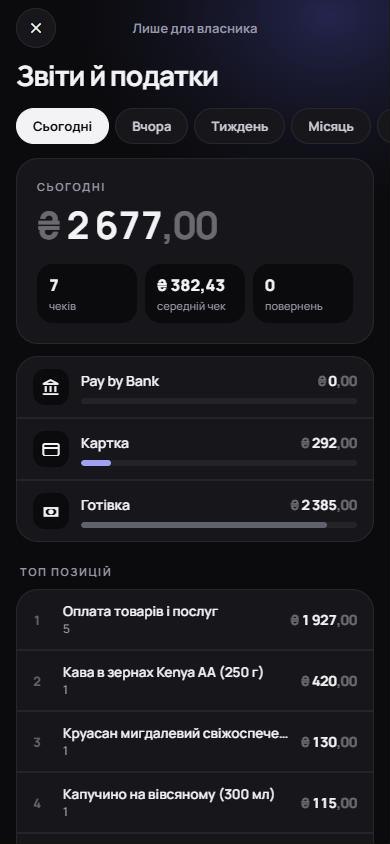
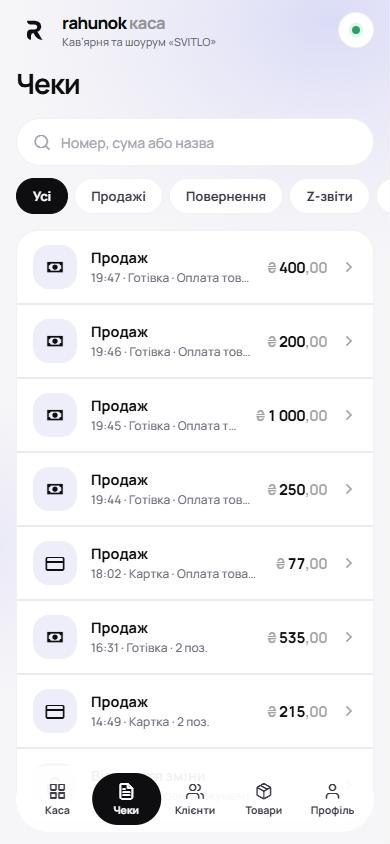
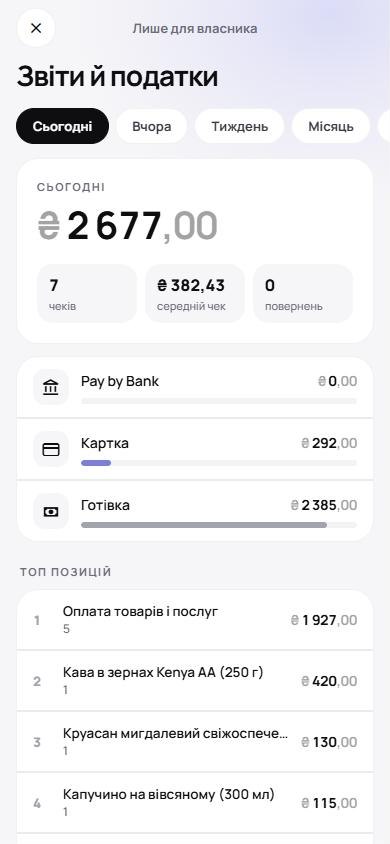
Revenue for any period, payment methods, the income ledger in CSV — in one tap.
Security
Owner and cashier roles, PIN, reports and settings for the owner only.
Without power or internet
How offline mode works, what happens to receipts and where its limits are — no small print.
These limits are set by law. The register shows how many hours are left and warns you in advance.
The register opens an offline session under the Law on cash registers by itself. The seller doesn’t switch anything — a yellow banner with a counter appears on screen.
Each receipt gets an offline number with a CRC32 checksum under Ministry of Finance Order No. 317 and a verification QR. The customer gets it immediately.
Receipts are queued in a local log with a hash chain. Even if the phone restarts, the queue isn’t lost.
As soon as the internet is back, the register closes the offline session and sends all receipts to the DPS in the right order. The status of each one is visible in the log and the dashboard.
Start
No USB keys, no queues at the tax office, no IT person. Here’s how it goes, minute by minute.
Підпис
Вхід з КЕП
Пароль ключа не зберігається
Реєстрація ПРРО
Подаємо в ДПС
Оплачено
₴ 185,00
Зареєстровано в ДПСФОП Коваленко Олена Сергіївна
Кав’ярня та шоурум «SVITLO»
м. Київ, вул. Рейтарська, 19Б
ІД 3481920451 · ФН 4000984125
Фільтр-кава Ефіопія (250 мл)
1 × 85,00 · Б
Круасан мигдалевий
1 × 100,00 · Б
Processing time depends on the tax service, usually minutes.
Pick your business, press “Run a test payment” or switch off the power to feel how the register works in real conditions.
For accountants
The client sells — the register is already counting. Income ledger, limits and taxes ready for the tax return without spreadsheets or screenshots.
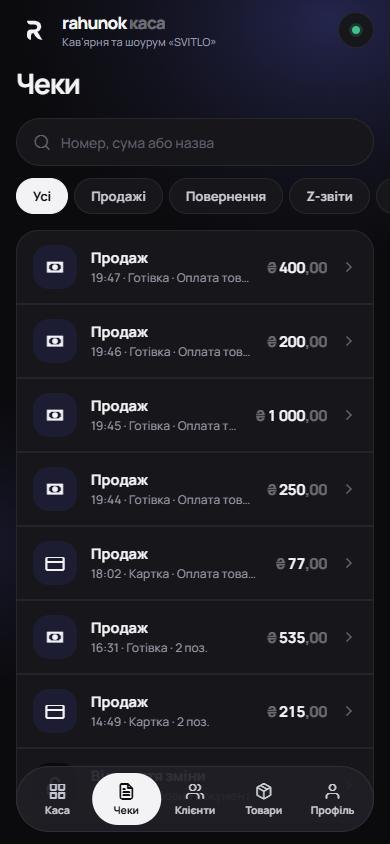
CSV for Excel: every receipt and refund with date, number and payment method, with monthly totals.
Income since the start of the year against the FOP group 1–3 limit, with a forecast of when it will be reached.
Single tax, military levy and SSC per month and quarter at 2026 rates.
Scheduled auto-Z and a safeguard: a shift never runs past 24 hours.
The result of every 20-OPP, 1-PRRO, 5-PRRO filing and every document.
A copy of the control tape in one tap — in case of an audit.
Goods received notes, write-offs, stocktaking, FIFO cost.
The owner sees reports and settings, the cashier only sales. Sign-in with a PIN.
For accountants and accounting firms
One standard for all clients: the same CSV, the same Z-reports, no register fees. We’ll help move your clients and set up PRRO registration for your process. Tell us how many FOPs you keep.
Owner & accountant dashboard
A web dashboard for the owner and the accountant: all payments, fiscal receipts, stock and taxes in real time. No screenshots, no “send me the statement”, no access to the bank.
Every payment — Tap to Pay, Pay by Bank, QR, link or cash — sits next to its fiscal receipt. No more reconciling register, bank and terminal by hand.
The owner invites the accountant to the dashboard. The accountant sees and exports data but can’t change prices, the IBAN or issue refunds.
An accountant who keeps several FOPs switches between them in one click. Each client is separate, data never mixes.
Accountant questions
We collected the questions accountants ask first when a client moves to a new register.
Free accountant tools on rahunok.com:
No. The owner sends you an invitation and you sign in with your own account in the “Accountant” role. The QES key stays on the owner’s phone and isn’t needed for viewing.
You see everything: payments, fiscal receipts, refunds, Z-reports, stock, the income ledger and taxes. Only the owner can change prices, bank details or issue refunds — so you’re protected from accidental edits.
Every Pay by Bank and QR payment carries an invoice reference (RH-…) that also appears in the payment purpose on the statement. Cards show the mask, authorisation code and RRN, like on a slip. Filtering by payment method gives a total you can compare with the statement straight away.
Next to every receipt: its status, the fiscal number assigned by the DPS and a QR to check it in the Electronic Cabinet. Offline receipts are marked separately and show exactly when they were transmitted.
Income ledger, receipt register, payments and stock — as CSV that opens correctly in Excel, Cyrillic included. For any period: day, month, quarter, year.
A refund receipt links to the original receipt and reduces income in the ledger on the refund date. Cash rounding to 10 kopecks under NBU rules is shown on a separate line.
The dashboard tracks income since the start of the year against the FOP group limit and forecasts when it will be reached. Single tax, military levy and SSC per month and quarter — at 2026 rates. This is a reference calculation: we update rates when the law changes, while special cases and filing decisions stay with the accountant.
All receipts, Z-reports and DPS acknowledgements are archived for 3 years. The control tape for any period can be exported in a minute.
From morning coffee to an evening salon appointment. Press “+” to see your scenario.
“The barista no longer calls to ask if the money came in”
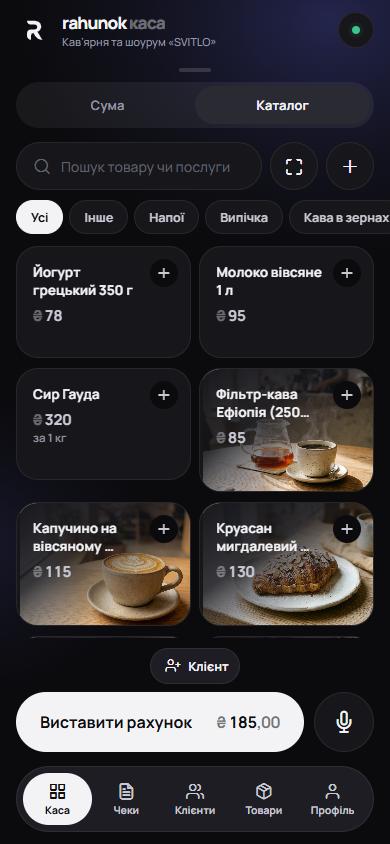
An invoice in two taps, parked tables, QR auto-confirmation without access to your bank, a Wallet card and separate tips for the barista via a Jar.

“Barcode scanner, returns and group 2 limit control”
Product categories, camera or USB/Bluetooth scanner, partial returns, an owner PIN and an FOP limit forecast.

“Minus terminal rental — plus regular customers in Wallet”
Payment at the counter or by link in a messenger, a screen in 10 languages for foreign guests, auto-Z in the evening and cashback that brings customers back.
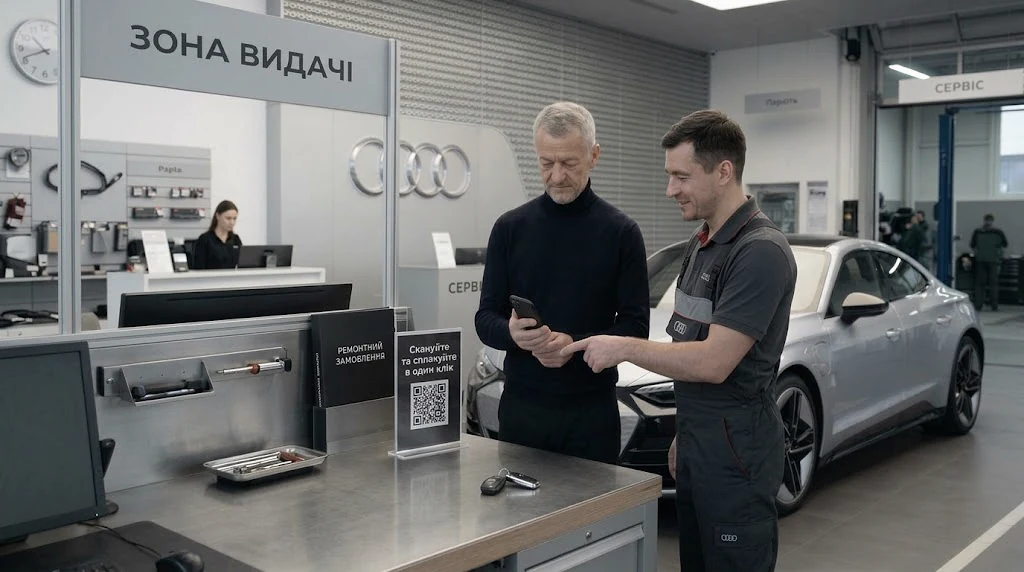
“Said the amount out loud — the receipt is already on the customer’s phone”
Voice entry of work and amount, mixed cash + card payment in one receipt and calm work without internet in the garage.

“Works on the road, in the park and during power cuts”
Up to 36 hours without connection with 2,000 offline receipts, or a no-fiscalisation mode for FOP group 1 — the register is always in your pocket.
Send a payment link in the same chat where you talk to the customer, and hand over the DPS receipt in a second.
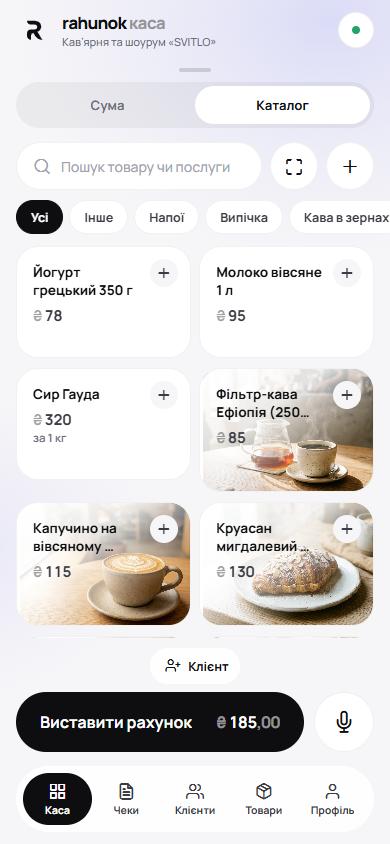
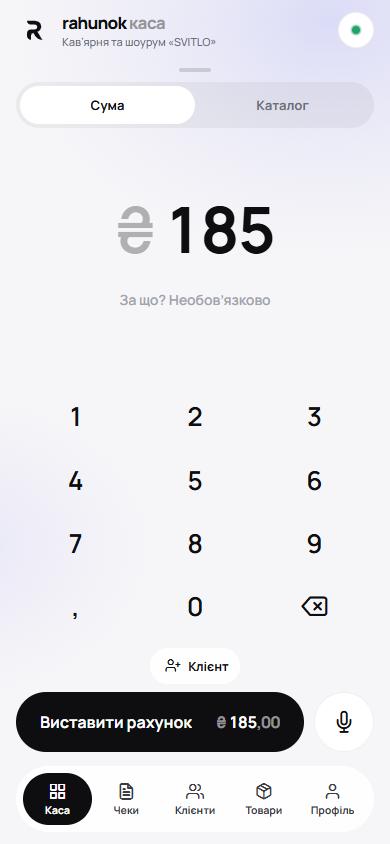
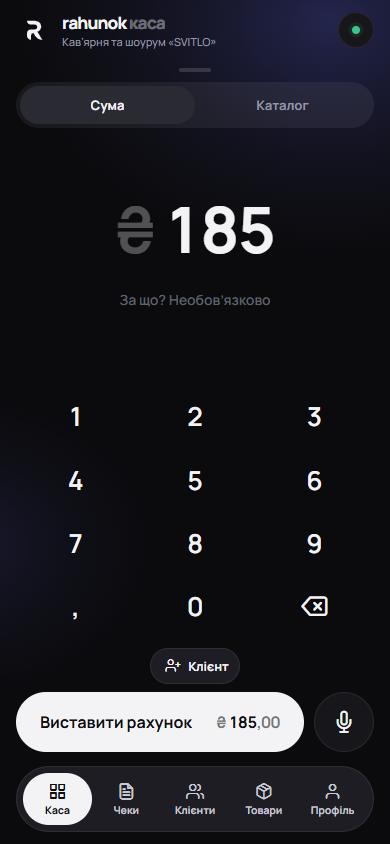
We removed everything you don’t need to sell from the main screen: amount, keypad, “Issue invoice”. Drag the slider on the phone to compare light and dark themes.
The register follows the phone’s theme. Double-tap the logo to switch it manually: sun by day, bar by night.
On a tablet or foldable the register and receipt sit side by side, navigation on the side, catalogue in 3–4 columns.
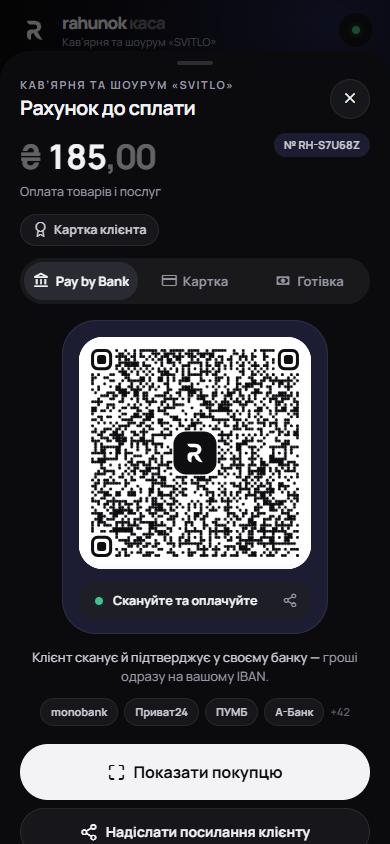
Screenshots taken from a working register on the DPS test server. Try it yourself in the demo — no sign-up.
Invoice to pay: NBU QR to your IBAN, card or cash in one sheet.
What paid services charge a subscription for costs ₴0 in Rahunok Kasa.
Comparison by type of solution as of November 2026. Features and prices of specific services differ — check their websites.
Savings calculator
Enter your turnover — and see how much goes on fees, rental and subscriptions every year, and how much you keep.
You keep per year
+17,595 ₴
+1,466 ₴ a month · that’s a few months of coffee or supplies
How we calculate: 75% of turnover is cashless; card fee 1.3%, Pay by Bank and QR 0.2%; terminal rental ₴400 and PRRO subscription ₴200 per month. Actual rates depend on your bank. FOP limits and taxes are a reference calculation at 2026 rates, not tax advice. Detailed margin and acquiring calculator on rahunok.com
| Single-tax group | Income limit | Single tax | Military levy | SSC |
|---|---|---|---|---|
| Single-tax group 1 | 1,444,049 ₴ (167 МЗП) | up to ₴332.80/mo | ₴864.70/mo | 1,902.34 ₴/mo |
| Single-tax group 2 | 7,211,598 ₴ (834 МЗП) | up to ₴1,729.40/mo | ₴864.70/mo | 1,902.34 ₴/mo |
| Single-tax group 3 (no VAT) | 10,091,049 ₴ (1 167 МЗП) | 5% of income | 1% of income | 1,902.34 ₴/mo |
No subscription, no receipt limits. The first 10,000 entrepreneurs get every feature for free. Bank and partner services are billed at their own rates, if you choose them.
basic register — for everyone, no subscription or receipt limits
The first 10,000 entrepreneurs get every feature for free
Some advanced features may become paid later. The basic register stays at ₴0.
Optional. Billed by the service providers.
These services aren’t required for the register to work. Banks, accountants and suppliers provide and bill them on their own terms.
Several locations, a chain or a CRM integration?
Straight answers about PRRO, the DPS fiscal server, Pay by Bank, offline mode and FOP taxes 2026.
The basic register is free for everyone: fiscal receipts to the DPS, offline mode, accepting payments, PRRO registration, Z-reports and the income ledger — no subscription or receipt limits. The first 10,000 entrepreneurs also get all advanced features for free. Some advanced features may become paid later, but the basic register stays at ₴0. Services from other companies may cost money if you choose them: card acquiring, crediting transfers, bookkeeping, QES or hardware. They are billed by their providers.
Rahunok is a payments ecosystem for small businesses: invoices, QR and Pay by Bank. The register is part of it, so we keep the basic version free. We plan to earn from advanced features (some may become paid later) and from custom projects for chains and integrations. The register takes no commission on your payments: money goes straight to your IBAN.
Rahunok Kasa (Рахунок Каса) is the free cash register and PRRO from Rahunok, a payments ecosystem for small businesses. On rahunok.com you issue invoices and accept NBU QR and Pay by Bank payments; Rahunok Kasa adds fiscalisation on top: receipts to the DPS, Z-reports, the income ledger and an accountant dashboard. One IBAN, one payment flow — from invoice to fiscal receipt.
It’s a transfer from the customer’s account straight to your IBAN — no card and no terminal (A2A, account-to-account). The register generates a QR code to the National Bank of Ukraine standard with the amount, IBAN and payment reference; the customer scans it and their banking app opens with the transfer pre-filled. Pay by Bank works via open banking: the customer picks their bank and confirms the payment. The money lands in the FOP’s account immediately; the fee follows your bank’s tariff, often 0–0.5% instead of 1.3–1.8% for card acquiring. As soon as the payment is confirmed, the register issues the fiscal receipt automatically.
Open the register and try the demo without signing up. For live receipts, sign in with any qualified e-signature (a key file from any qualified provider or monoKEP): the register files 20-OPP, 1-PRRO and 5-PRRO in the Electronic Cabinet itself. Add your IBAN and you can ring up the first receipt. If you don’t have a QES yet, the DPS qualified provider issues one for free, and monoKEP is set up in the monobank app in a few minutes. Processing time depends on the DPS, usually minutes.
Three things: any qualified electronic signature (a key file from any qualified provider or monoKEP), an FOP account with an IBAN, and a smartphone, tablet or computer with a browser. The web register works now; iOS and Android apps are coming soon.
The QES key is kept on your device in encrypted storage and never sent to Rahunok servers; the key password isn’t stored by default. Receipts already sent are stored on the DPS fiscal server. Products, the log and settings live on the device, so save the archive regularly: “Profile” → “3-year archive”. If the device is lost, contact your QES provider to block the key and sign in on a new device.
Export the product catalogue from your old service as CSV and import it into “Products” (UTF-8 and Windows-1251 both work, columns are recognised by name, duplicates are updated). Register the new register right from the app and close the old one in the previous service after a Z-report. PRROs registered in Rahunok are cancelled from the app too.
Each point of sale is a separate register on its own smartphone or tablet, with no limit on the number. Several cashiers can work on one register: the seller signs in with a PIN and only sees sales, while reports and settings are for the owner. All registers and locations are visible in one owner web dashboard: payments, receipts and stock — together or per location.
The register creates a refund receipt, including for some items only: discounts and payment methods are recalculated automatically. Cash is paid out from the register, card refunds go through the acquiring bank. A QR transfer is refunded from your bank to the customer’s account; we plan to add automatic transfer refunds from the register.
In “Reports & taxes” the owner exports the CSV income ledger for a quarter or a day in one tap and sends it to the accountant via any messenger or email. It contains every receipt and refund with date, number and payment method, plus monthly totals. Even simpler — invite the accountant to the web dashboard: they see payments, fiscal receipts, stock and taxes and export everything they need, but can’t change anything. An accountant who keeps several FOPs switches between them in one dashboard.
In most cases — no. The main payment goes through NBU 003 QR straight to your IBAN (usually 0–0.5% instead of 1.3–1.8%). And if the customer wants to tap Apple Pay or a physical card, a card payment via Tap to Pay opens on your smartphone in one tap — currently with acquiring from monobank, PrivatBank or A-Bank, more banks are being connected (fee at the bank’s rate).
Never. The monobank statement token is kept separately on the owner’s server (mono-bridge), and the seller’s phone only receives a “Paid ✓” reply every 2 seconds. On top of that, the owner’s 4-digit PIN locks monthly reports, IBAN settings, product prices and refunds.
The register keeps working. It opens an offline session under the Law on cash registers by itself (up to 36 hours in a row and 168 hours a month), issues valid receipts with a CRC32 checksum, stores them on the phone and sends them to the DPS as soon as the connection is back.
Turn on the auto Z-report (for example, at 23:55 with a reminder 30 minutes before). Even without a schedule, a 23 h 30 min shift safeguard applies — the register creates the Z-report (<ZREP>) itself and closes the shift before the 24-hour limit. It works while the app is open, or right on the next launch.
Because from the very first QR payment they automatically get a bonus card in Apple or Google Wallet — no forms, no dictating a phone number. And you don’t lose margin: you simply share with the customer half of what the terminal fee used to take.
The state DPS fiscal server is free. Rahunok Kasa builds documents directly using the open DPS protocol (Order No. 317) — no paid middleman. To go live, the FOP files 20-OPP, 1-PRRO and 5-PRRO once, for free, in the Electronic Cabinet.
For FOP groups 1, 2 and 3 on the single tax without VAT (excise stamps and VAT aren’t supported yet). In the 2026 tracker (minimum wage ₴8,647, subsistence minimum ₴3,328): group 1 — limit ₴1,444,049 (single tax up to ₴332.80, military levy ₴864.70, SSC ₴1,902.34/mo); group 2 — ₴7,211,598 (single tax up to ₴1,729.40, military levy ₴864.70, SSC ₴1,902.34/mo); group 3 — ₴10,091,049 (single tax 5%, military levy 1%, SSC ₴1,902.34/mo).
No. The “Tips” button appears on the issued receipt screen and shows a QR for a separate monobank Jar. Tips aren’t added to the DPS fiscal receipt or the income ledger.
The law allows electronic receipts (QR on screen or a link in a messenger). If you need paper, the register prints to a 58 mm Bluetooth thermal printer with a DPS verification QR (directly via Web Bluetooth in Chrome; on the phone via “Share” until native BLE is added).
Trust
A register means money and the tax office. So, upfront: where your data is, who we are and how to leave if you don’t like it.
The register builds documents using the open DPS protocol (Ministry of Finance Order No. 317). Every receipt is stored on the DPS fiscal server and can be checked by QR.
The QES is kept on your device in encrypted storage and never sent to Rahunok servers. The key password isn’t stored by default.
Rahunok is not a bank and doesn’t hold funds. QR payments go from the customer’s bank straight to your IBAN.
Products, the log and the income ledger export to CSV, the 3-year archive in one tap. You can cancel the PRRO right from the app.
The basic register stays at ₴0. What’s free today and what may become paid later is written plainly in the Pricing section.
RAHUNOK LLC, EDRPOU 45679768, Kyiv. Diia.City resident. Part of the Rahunok ecosystem — invoices, QR and Pay by Bank for business.
Short and sourced: what Ukrainian law says about PRRO in 2026 and how to set everything up yourself.
Join
Coffee shops, salons, services and stores across Ukraine are moving to a register that charges no subscription, works without power and counts taxes on its own. Take your place among the first 10,000.
We’ll help with the QES, PRRO registration and your first receipt. And for the first 100 sign-ups we’ll make a branded acrylic QR stand for your counter — also free.

 Diia.City resident